

All Serial steps include an edit window to configure the Step for execution.
In each edit windows, you have to select a VISA Resource corresponding to a valid resource name configured in MAX.
The VISA Resource control is a TestStand Expression Edit. It allows only a string value, but you can select an auto populated VISA Resource available on your system by clicking on the drop down menu or by selecting a TestStand Variable like locals.MyDeviceName.
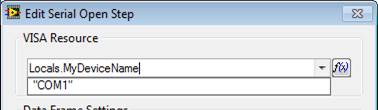
The OK button of configuration dialog box for each step is enabled only if a VISA Resource is entered.
Each steps includes also a built in help button to give you more information about each steps and how to use it.
|
|
Note VISA Resources are listed when open the Edit windows of a Step. If you change your VISA configuration with an edit window opened, you need to close it and reopen the edit window to see your new configuration. |
See Also
Configure serial Communication
