

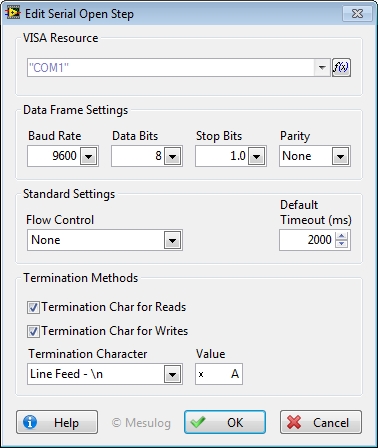
This step initializes the serial port specified by VISA resource to the specified settings.
To configure this step open the Edit Step window from Sequence editor.
In the Configuration Dialog Box, select a valid VISA Resource.
For this Step, you can configure:
Data Frame Settings:
• Baud Rate: rate of transmission. The default is 9600.
• Data Bits: number of bits in the incoming data. The value of data bits is between five and eight. The default value is 8.
• Stop Bits: number of stop bits used to indicate the end of a frame. This input accepts the following values.
• Parity: parity used for every frame to be transmitted or received. This input accepts the following value.
Standard Settings:
• Flow Control: type of control used by the transfer mechanism. This input accepts the following values:
o None (default)
o XON/XOFF
o RTS/CTS
o XON/XOFF and RTS/CTS
o DTR/DSR
o XON/XOFF and DTR/DSR
• Timeout (ms): time, in milliseconds, for the write and read operations. The default is 10000.
Termination Methods:
• Termination Char for Reads: prepares the serial device to recognize termination char for Read Operations.
• Termination Char for Writes: prepares the serial device to recognize termination char for Write Operations.
• Termination Character: Termination character used for selected operations (Reads, Writes or Both).
At execution, step configuration is added to the report.
|
|
Tip It is recommended to place a Close Step in the cleanup part of your sequence to release the VISA Resource even if an error occurred. |
See Also
