

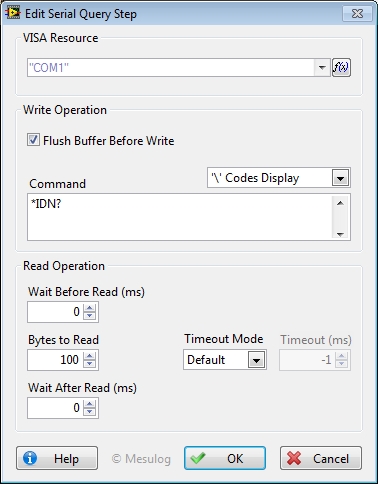
This step performs a write operation followed by a read operation.
To configure this step open the Edit Step window from Sequence editor.
In the Configuration Dialog Box, select a valid VISA Resource.
For this Step, you can configure:
Write Operation:
• Flush Buffer Before Write: flush the buffer before writing command.
• Command: contains the data to be written to the device.
|
|
Note You don't need to add quotes ( " or ' ) to the string command. For example, to request the identification you can type: *IDN? |
Read Operation:
• Wait Before Read (ms): time, in milliseconds, to wait between write and read operations.
• Bytes to read: Maximum number of Bytes to read in the buffer.
• Timeout (ms): time, in milliseconds, for the write and read operations. The default is -1 that corresponds to the configuration of the Open Step.
• Wait After Read (ms): time, in milliseconds, to wait after the read operation finished.
|
|
Note If you specified a termination character for read operations with the Open Step for the selected VISA Resource, you must specifies a value that is equal or bigger than the response for Bytes to read. |
|
|
Tip Wait After Read option can be helpful if you need to execute multiple query on the serial bus and your device need some time between each operation. |
At execution, the step configuration and results are added to the report.
The value of the Buffer is saved in Step.Result.DataRead.
|
|
Tip You may configure a Post-Expression to set the
read value in another variable : |
See Also

