

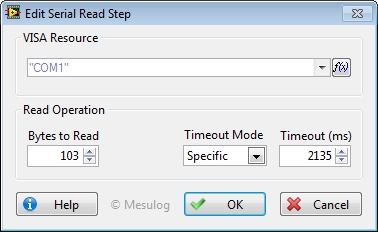
This Step reads the specified number of bytes from the device or interface specified by VISA resource and returns the data in read buffer.
To configure this step open the Edit Step window from Sequence editor.
In the Configuration Dialog Box, select a valid VISA Resource.
For this Step, you can configure:
• Bytes to read: Maximum number of Bytes to read in the buffer.
• Timeout (ms): time, in milliseconds, for the write and read operations. The default is -1 that corresponds to the configuration of the Open Step.
|
|
Tip If you specified a termination character for read operations with the Open Step for the selected VISA Resource, you must specifies a value that is equal or bigger than the response for Bytes to read. |
At execution, step configuration and results are added to the report.
The value of the Buffer is saved in Step.Result.DataRead.
|
|
Tip You may configure a Post-Expression to set the
read value in another variable : |
See Also
