NI Emerson (formerly National Instruments) recommends an "urgent" update of NI-PAL. A simple check can prevent malfunctions of your measurement equipment after certain Windows updates, from 10 November 2026 onwards.
As part of our technology watch and our partnership of more than 25 years with NI Emerson, MESULOG would like to share important information about the security and proper operation of automated test and measurement systems.
NI has identified several vulnerabilities affecting NI-PAL, a software component used by many NI drivers. A fix is available, and installing it generally requires no change to your LabVIEW or TestStand applications, nor to the versions of your existing NI drivers.
Beyond cybersecurity, this update deserves particular attention: from 10 November 2026, Windows security updates will block older versions of NI-PAL from loading on PCs where vulnerable driver protection is enabled, with a direct impact on test bench operation.
1. What is NI-PAL and what is it for?
NI-PAL (NI Platform Abstraction Layer) is a low-level software component used by many NI drivers. It provides common technical services that allow the drivers to communicate with the operating system and access the resources measurement equipment needs to operate.
Take the example of an automated test bench using an NI data acquisition board:
- LabVIEW or TestStand runs the test sequences and measurement operations.
- NI-DAQmx handles communication with the acquisition board.
- NI-PAL provides system services used by the NI drivers.
- Windows manages system resources and exchanges with the hardware.
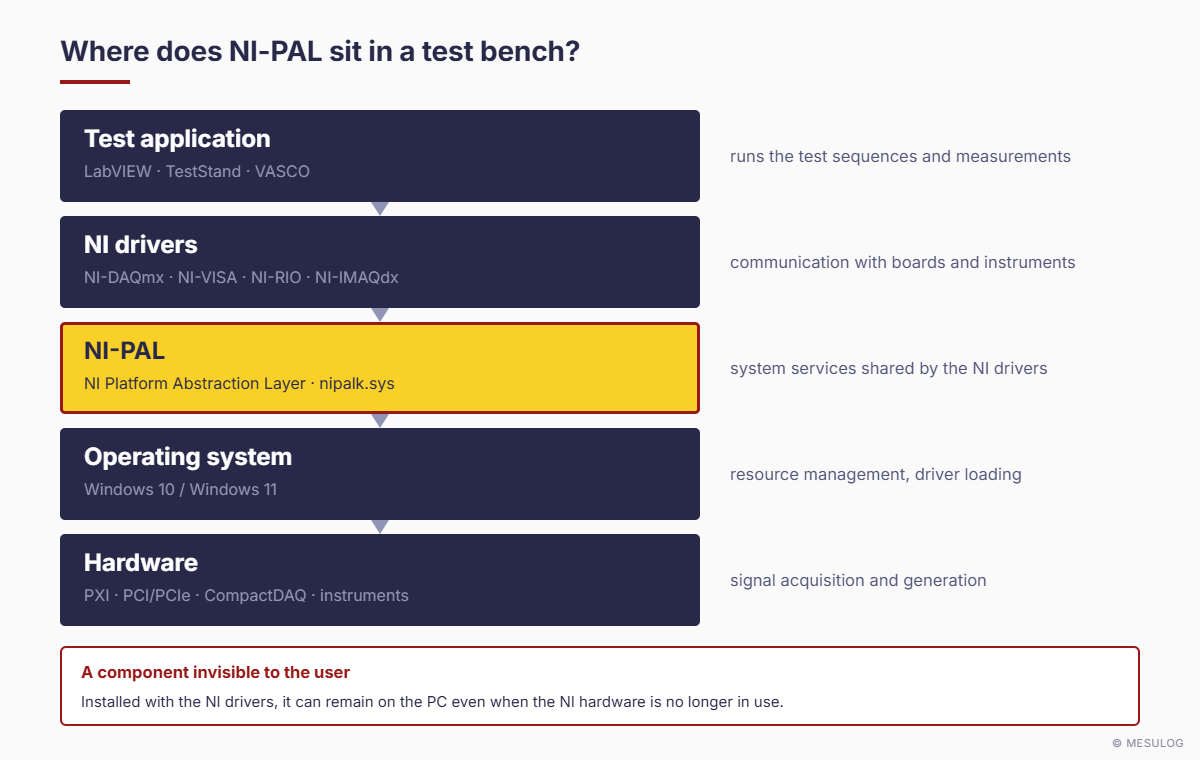
This simplified view explains why NI-PAL can be installed on a computer without its user being aware of it. NI-PAL is likely to be present on PCs with NI-DAQmx, NI-VISA, NI-RIO or other NI Emerson software components installed. It can also remain installed on a PC even when NI equipment is no longer in use.
The key point: whether you are affected does not depend on using LabVIEW or TestStand, but on the presence of a vulnerable version of NI-PAL on your system.
2. What vulnerability has been identified?
NI Emerson has published several security advisories concerning NI-PAL, including vulnerability CVE-2026-18485, which affects versions 26.3.1 and earlier on 64-bit Windows 11 and 10. Only Windows installations are affected.
This vulnerability can allow privilege escalation, i.e. obtaining higher system rights than those normally granted to a user. It is important to note, however, that exploiting it requires authenticated local access to the computer. It is therefore not a flaw that an unauthenticated user can exploit remotely from the Internet.
This puts the risk into perspective, particularly for industrial test benches running on isolated networks with controlled user access. This restriction does not eliminate the security risk, however, and NI recommends installing the fix.
NI security advisory — Local Privilege Escalation in NI-PAL (CVE-2026-18485)
3. Why plan ahead of 10 November 2026?
Microsoft maintains a list of drivers with known vulnerabilities, which Windows security mechanisms can prevent from loading. Some older versions of NI-PAL are on this list.
From 10 November 2026, Windows security updates will block the NI-PAL component from loading wherever the corresponding protection is enabled.
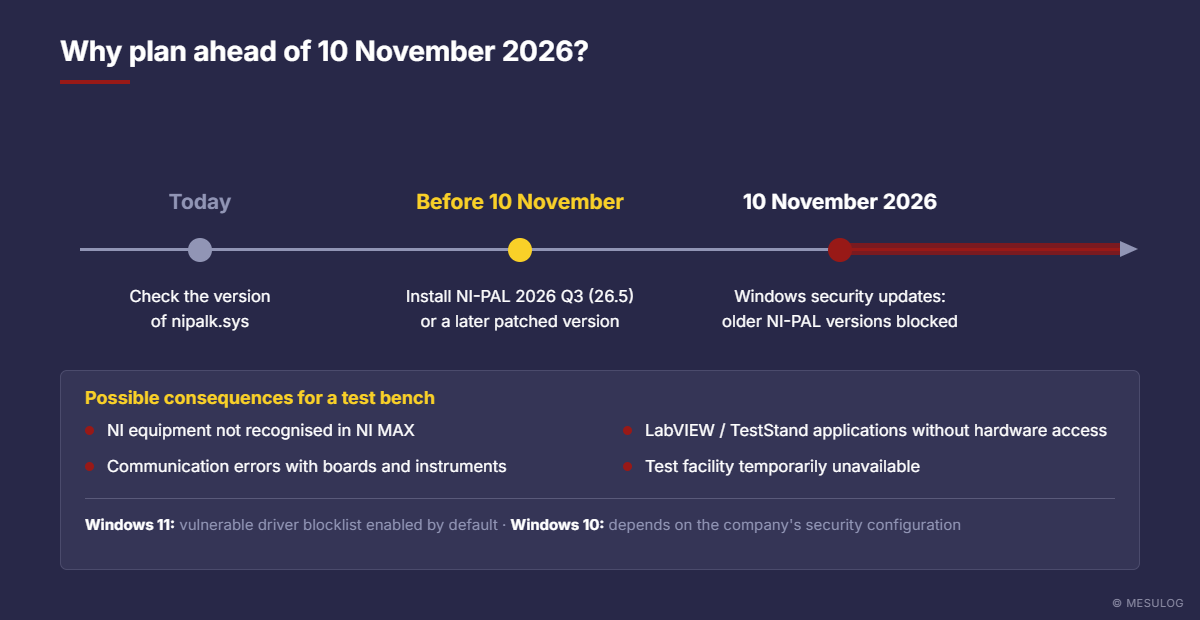
For an industrial test bench, the possible consequences include:
- NI equipment no longer recognised in NI Measurement & Automation Explorer (NI MAX).
- Communication errors with instruments or acquisition boards.
- LabVIEW or TestStand applications no longer able to access the equipment.
- Temporary unavailability of the test bench or test facility.
The risk mainly concerns Windows 11, where the vulnerable driver blocklist is enabled by default. On Windows 10, this protection may also be enabled depending on the company's security configuration.
This does not mean that every test bench will stop working on 10 November. It is a Windows security change that may affect some installations running a vulnerable version of NI-PAL. The aim is to anticipate the situation rather than discover a problem at the next system update.
4. Which systems are likely to be affected?
We recommend this check to users of Windows PCs with NI Emerson software components installed, in particular:
- Automated test benches developed with LabVIEW or TestStand.
- Acquisition systems using PXI, PCI, PCIe or CompactDAQ equipment.
- PCs with NI-DAQmx, NI-VISA or NI-RIO drivers.
- Industrial supervision or control applications using NI equipment.
- Older measurement systems, even those no longer regularly updated.
Applications developed by MESULOG may also be affected when their Windows environment includes NI drivers that use NI-PAL. This is not a vulnerability specific to applications developed by MESULOG, but an infrastructure component supplied by NI Emerson.
5. How do you check whether your PC needs the update?
The check takes less than a minute and makes no change to your installation. On your Windows PC:
- Open File Explorer.
- Go to the folder
C:\Windows\System32\drivers. - Find the file
nipalk.sys. - Right-click the file and select Properties → Details.
- Read the Product version field.
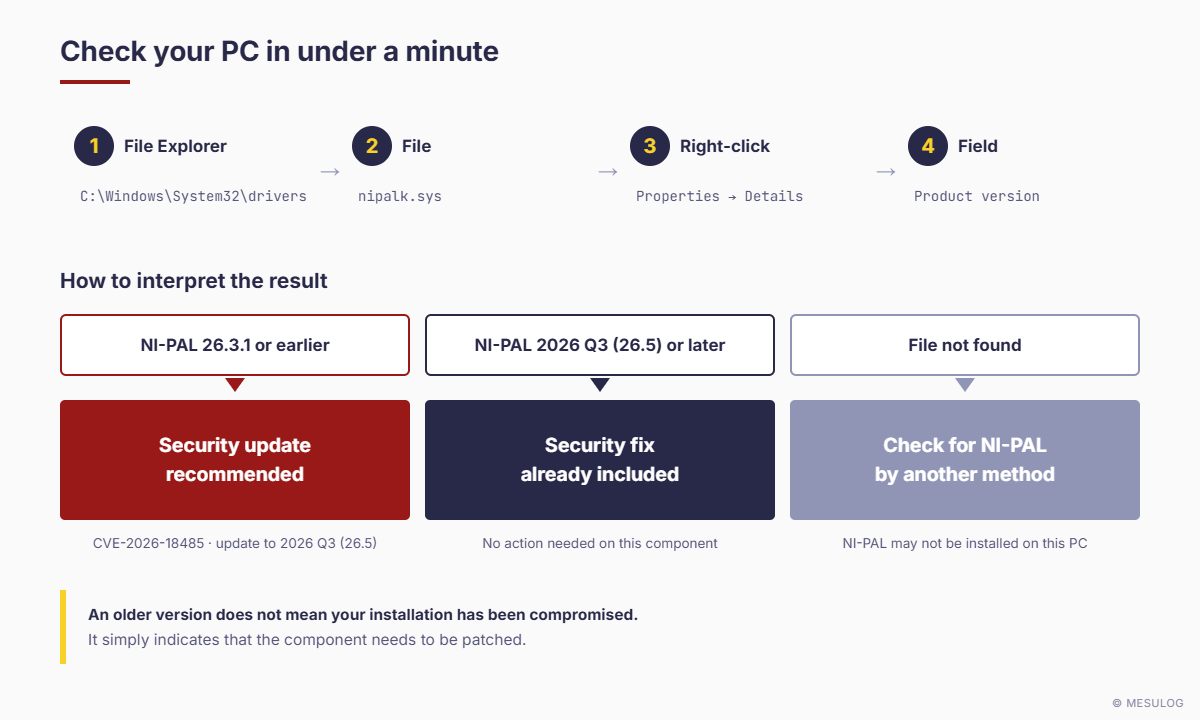
How to interpret the result
| Installed version | Recommendation |
|---|---|
| NI-PAL 26.3.1 or earlier | Security update recommended |
| NI-PAL 2026 Q3 (26.5) or later | Security fix already included |
| File not found | No NI-PAL component on the PC, or check for NI-PAL by another method if needed |
An older version does not mean your installation has been compromised. It simply indicates that the component needs to be patched.
6. How do you perform the update?
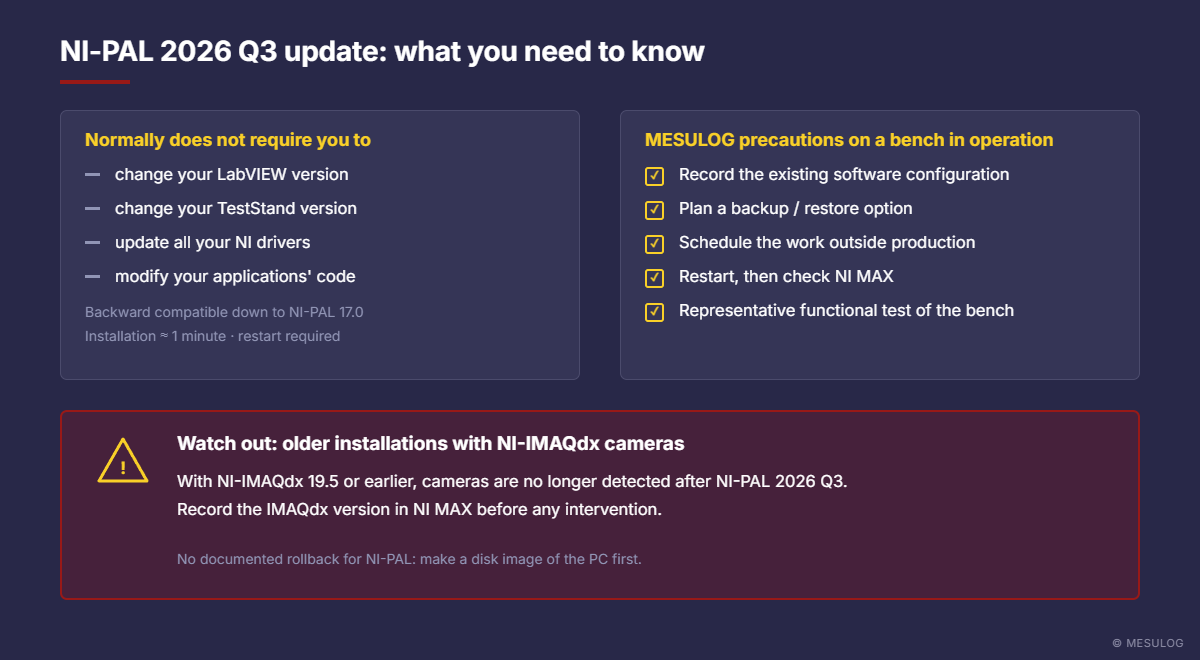
NI provides a targeted update to NI-PAL 2026 Q3 (26.5) or a later patched version. This normally does not require you to:
- Change your LabVIEW version.
- Change your TestStand version.
- Update all your NI drivers.
- Modify the source code of your measurement applications.
Exception: PCs with cameras using NI-IMAQdx 19.5 or earlier, which require Vision Acquisition Software to be updated first (see "Special case: cameras and NI-IMAQdx" below).
NI states that the update is backward compatible with NI-PAL versions down to at least 17.0. Installation generally takes about one minute and requires the PC to be restarted.
The official instructions and the fix are available on the NI website: NI — Required NI-PAL Security Update: official instructions
A few precautions for industrial test benches
Even though the update is announced as compatible, MESULOG recommends taking a few precautions on systems in operation:
- Record the existing software configuration.
- Make sure a backup or restore option is available.
- Schedule the work at a suitable time.
- Restart the PC after installation.
- Check that the NI equipment is recognised.
- Run a representative functional test of the bench.
Special case: cameras and NI-IMAQdx
NI has documented an incompatibility between NI-PAL 2026 Q3 (26.5) and NI-IMAQdx versions 19.5 and earlier, the driver installed with Vision Acquisition Software for USB, GigE Vision, Camera Link and other cameras. The symptom is unambiguous: after the update, the cameras no longer appear in NI MAX and can therefore no longer be accessed from LabVIEW.
On a PC with cameras, you should therefore record the installed versions before doing anything: in NI MAX, go to My System › Software, then select NI-IMAQdx and NI-PAL.
| NI-IMAQdx installed | Compatible with NI-PAL 26.5 | Recommended action |
|---|---|---|
| 20.0 or later | Yes | Check compatibility with your LabVIEW version, then check camera detection in NI MAX after the update. |
| 19.5 or earlier | No | First move to a compatible software combination (see below). |
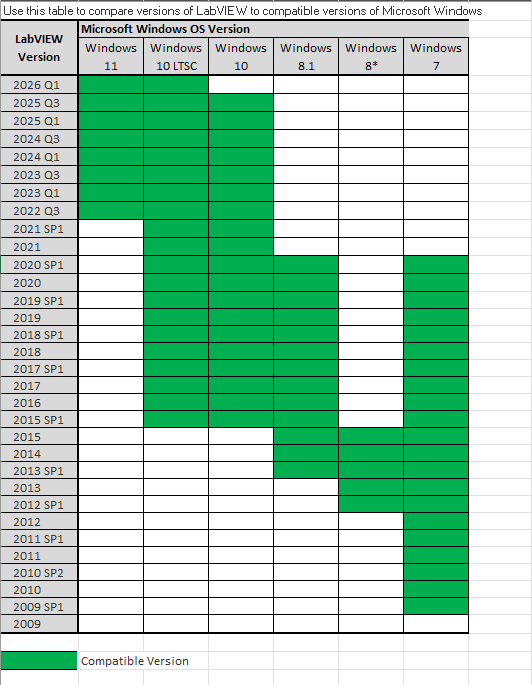
- LabVIEW 2017 to 2020: install Vision Acquisition Software 20.0 or later via NI Package Manager, check that NI-IMAQdx 20.0 is present, then check camera detection.
- LabVIEW 2014 to 2016: NI-IMAQdx 20.0 does not support these versions. Two options: migrate to LabVIEW 2017 or later, or keep an existing combination (NI-IMAQdx 17.5 with a compatible NI-PAL version), at the cost of not applying the security fix.
- FireWire (IEEE 1394) cameras: support was removed in NI-IMAQdx 20.0. These systems may have to stay on an earlier combination.
Note: to date, NI does not document a rollback procedure for NI-PAL. Restoring a working configuration may require uninstalling all NI software and reinstalling the previous versions. A backup or disk image of the PC before any intervention is therefore essential.
Read the NI article: cameras not detected in NI MAX after the NI-PAL 2026 Q3 update
7. MESULOG can support you
For more than 25 years, MESULOG has supported manufacturers in developing measurement software, automating tests and controlling test benches, particularly with NI technologies. Our expertise in LabVIEW, TestStand, NI-DAQmx, NI-VISA and industrial measurement architectures allows us to work on existing installations, including those not developed by our teams.
Our approach: Measure, Process, Decide. From measurement to processing, to extract the useful information and support decision-making.
For this NI-PAL update, we can help you to:
- Identify the affected installations — check the versions of NI-PAL and NI drivers present on your systems.
- Assess compatibility risks — analyse any constraints related to your software environment, your equipment or the age of your test bench.
- Prepare and carry out the update — assist you with installing the fix, taking your operating constraints into account.
- Validate that the system works correctly — check communication with the equipment, acquisitions and the main functions of your bench after the intervention.
Our goal is not simply to apply an IT update, but to preserve the availability and reliability of your test and measurement equipment. This support is available both to our long-standing customers and to manufacturers operating NI installations developed by other integrators.
8. MESULOG summary
Systems running NI-PAL 26.3.1 or earlier are affected and must be updated. The vulnerable driver blocklist is enabled by default on Windows 11 but not on Windows 10, although the settings may have been changed by the customer or the IT department. The NI-PAL update is backward compatible with NI-PAL versions down to at least 17.0.
9. An opportunity to check the long-term reliability of your test systems
This news illustrates a reality of industrial measurement systems: their operation does not depend solely on the software application or the acquisition hardware. Drivers, libraries and operating system components also contribute to the reliability of the whole.
Keeping track of these components is therefore part of the good practices that maintain the performance and availability of a test bench throughout its service life. In the case of NI-PAL, a simple check identifies the affected installations and lets you prepare the update calmly.
Would you like to check your installation or get support? The MESULOG teams are available to advise you, analyse your configuration and support you in updating and validating your measurement systems.
Technical references
- NI — Required NI-PAL Security Update
- NI — Security advisory CVE-2026-18485
- NI — Cameras not detected after the NI-PAL 2026 Q3 update (NI-IMAQdx)
Article written on 22 October 2026 based on information published by NI Emerson. NI's official recommendations take precedence and may change.
10. NI Update Service: urgent update
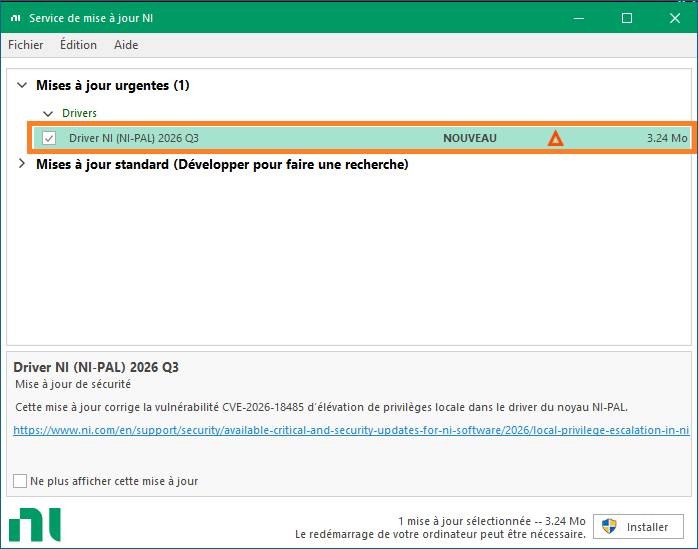
On 27 October 2026, we noticed that the urgent update had been published through NI Update Service.
This is the simplest method, and the one we recommend, for updating to the NI-PAL 2026 Q3 driver. This update fixes the local privilege escalation vulnerability CVE-2026-18485 in the NI-PAL kernel driver.
Select "NI Driver (NI-PAL) 2026 Q3" and click the "Install" button.